
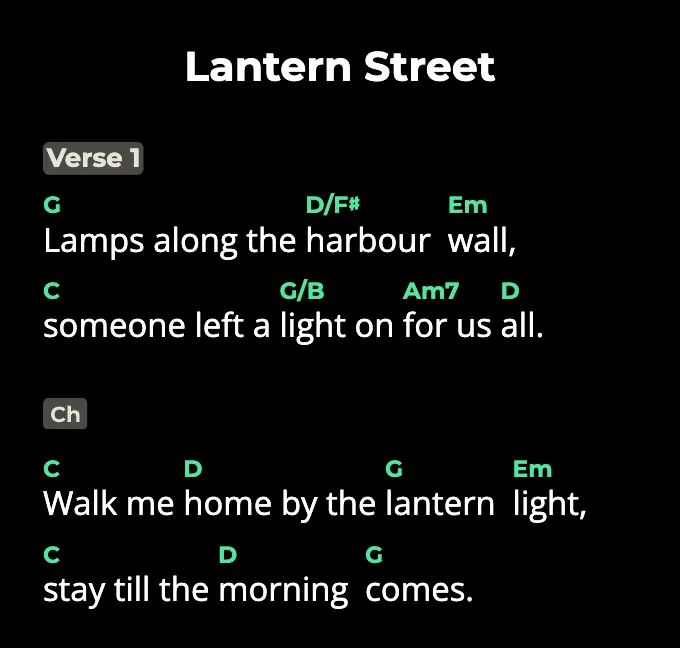
ChordPro is a plain-text format for songs with chords. Each chord goes in square brackets right before the syllable it falls on, as in [G]Lamps along the [D/F#]harbour wall, and lines in curly braces, called directives, give the title, the key, and where the chorus starts and ends. A program that reads ChordPro prints the chords above the words, lined up, in whatever font, size and key you choose. Because each chord sits inside the lyric line, nothing drifts out of place when the text reflows on a narrow screen or the song changes key. The format grew out of a program called "chord", written in 1992 by Martin Leclerc and Mario Dorion, and is maintained today as ChordPro 6.
What does a ChordPro file look like?
Here is a short song written for this article, as you would type it:
{title: Lantern Street}
{key: G}
{tempo: 92}

{start_of_verse: Verse 1}
[G]Lamps along the [D/F#]harbour [Em]wall,
[C]someone left a [G/B]light on [Am7]for us [D]all.
{end_of_verse}

{start_of_chorus}
[C]Walk me [D]home by the [G]lantern [Em]light,
[C]stay till the [D]morning [G]comes.
{end_of_chorus}

{chorus}
Lines in curly braces are directives; the others are lyrics with their chords. The last line, {chorus}, asks for the chorus again without typing it out.
Printed, the first line of the verse comes out like this, each chord over the syllable that followed its bracket:
| G | D/F♯ | Em |
|---|---|---|
| Lamps along the | harbour | wall, |
The chorus is usually set apart, indented or with a line beside it, and the title, key and tempo go at the top of the page.
How do the chords in square brackets work?
The bracket goes immediately before the letter where the chord changes, even in the middle of a word: har[D]bour puts the D over the second syllable. A few habits make files read the same everywhere:
- Chords are typed, not typeset:
bfor flat and#for sharp, so[Bb],[F#m7],[Cm7b5],[Eb/G]. A program prints them as B♭, F♯m7, Cm7♭5 and E♭/G if it knows how. - A chord with no word under it goes where it falls in the line: at the end,
for us [D]all. [D7], or on a line of its own for an instrumental passage,[G] [D] [Em] [C]. - Spell chords the usual way. A program has to recognise a chord to transpose it; an unusual spelling may be printed as written and left in the old key. Chord symbols explained covers the forms most musicians read.
- Don't put a space between the bracket and the syllable.
[G] Lampsputs the G over the space, a little before the word.
Which directives do you actually need?
A directive is a name, a colon and a value, between curly braces, alone on its line: {key: G}. Many have a short form, so {t: Lantern Street} is the same as {title: Lantern Street}. These are the ones that matter for everyday charts:
| Directive | Short form | What it does |
|---|---|---|
{title: …} | {t: …} | The song's title, at the top of the page. |
{subtitle: …} | {st: …} | A second line under the title: arranger, version. |
{artist: …}, {composer: …} | Who recorded it, who wrote it. | |
{key: G} | The key the chords are written in. Programs that transpose read it. | |
{tempo: 92}, {time: 4/4} | Beats per minute and the time signature. | |
{capo: 2} | The capo fret, for guitarists. | |
{comment: …} | {c: …} | A note printed in the song: "Half time from here", "Drums only". |
{start_of_verse}, {end_of_verse} | {sov}, {eov} | Mark a verse. A label after the colon names it: {start_of_verse: Verse 2}. |
{start_of_chorus}, {end_of_chorus} | {soc}, {eoc} | Mark the chorus, usually printed set apart. |
{chorus} | Repeats the chorus here without typing it again. | |
{start_of_bridge}, {end_of_bridge} | {sob}, {eob} | Mark a bridge. |
{start_of_tab}, {end_of_tab} | {sot}, {eot} | Guitar tab, kept in a fixed-width font. |
{start_of_grid}, {end_of_grid} | {sog}, {eog} | Chords bar by bar, in a grid, with no lyrics. |
{new_page} | {np} | Starts a new page when printed. |
ChordPro programs can also print a guitar chord diagram for each chord in the song; {define: …} sets a fingering of your own when the standard one won't do. A line that starts with # is a comment for whoever edits the file, and is not printed. The format leaves some choices to the program, such as how {chorus} is shown (the whole chorus again, or a "Chorus" label), and not every program reads every directive, so a file you send to other people is safest with the ones above. The names of the sections are your choice; if you are unsure what to call the parts of a song, see song structure.
How is ChordPro different from chords over lyrics?
The other way to write a chord sheet is "chords over lyrics": a line of chords above each line of words, lined up with spaces:
G               D/F#    Em
Lamps along the harbour wall,
In ChordPro the same line is [G]Lamps along the [D/F#]harbour [Em]wall,. It holds the same information in a sturdier way.
| Chords over lyrics | ChordPro | |
|---|---|---|
| Where the chord lives | On its own line, placed with spaces | Inside the lyric, in brackets |
| Font | Fixed-width, or the chords slide off their words | Any font |
| Changing key | A longer chord name pushes the next one along | Each chord stays on its syllable |
| Reading the raw file | Easy | Slower: the brackets break up the words |
| Narrow screens | Long lines wrap and split chords from words | The program wraps them together |
Chords over lyrics is easier to read before it is printed, which is why people still write it by hand; chords over lyrics shows how to keep that kind of sheet lined up. ChordPro is what you want once a song has to survive being moved between programs, phones and keys. Turning one into the other is mostly mechanical, and converting PDF chord sheets walks through it.
How do you transpose a ChordPro file?
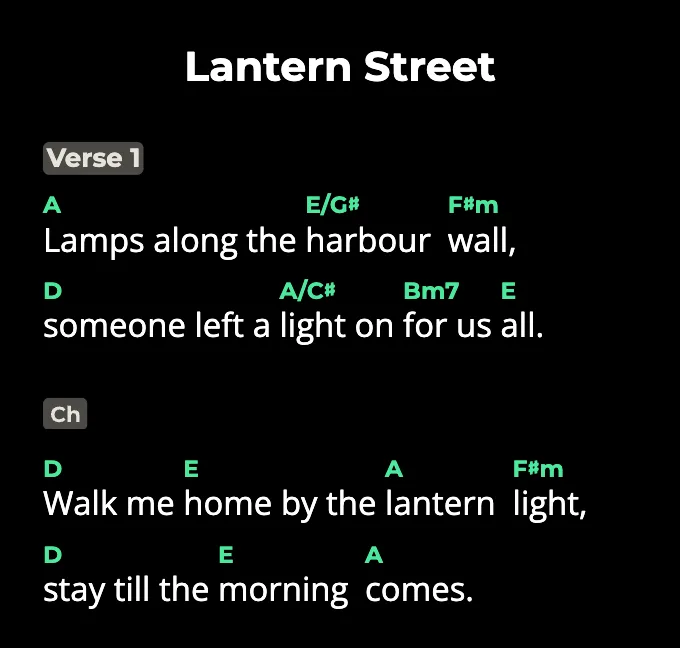
Because every chord is a separate bit of text, a program can move each one by the same interval and spell it for the new key. Here is Lantern Street moved from G up a whole step to A:
| In G | In A |
|---|---|
| G | A |
| D/F♯ | E/G♯ |
| Em | F♯m |
| C | D |
| G/B | A/C♯ |
| Am7 | Bm7 |
The file itself can stay in G: ChordPro programs can transpose when they display or print, and the format has a directive that does it inside the file: {transpose: 2} raises everything after it by two semitones. Check the spelling of what comes out: a good program writes B♭ in F major and A♯ in B major, never the other way round. How to transpose chords explains the rule.
What can't ChordPro do?
ChordPro says on which syllable a chord changes, not on which beat. For a singer or a strumming guitarist who knows the song, that is enough. For a band reading at sight it isn't: there are no bars (measures), no rhythm, and no melody. The grid section ({start_of_grid}) writes chords bar by bar, and newer versions can carry other notations inside a file (ABC, LilyPond), but not every program reads them. If the drummer needs to know that the chorus is eight bars with a stop in the last one, give them a bar-by-bar chart (how to write a chord chart), or a lead sheet if the melody matters.
Where does ChordPro fit in Gigplay?
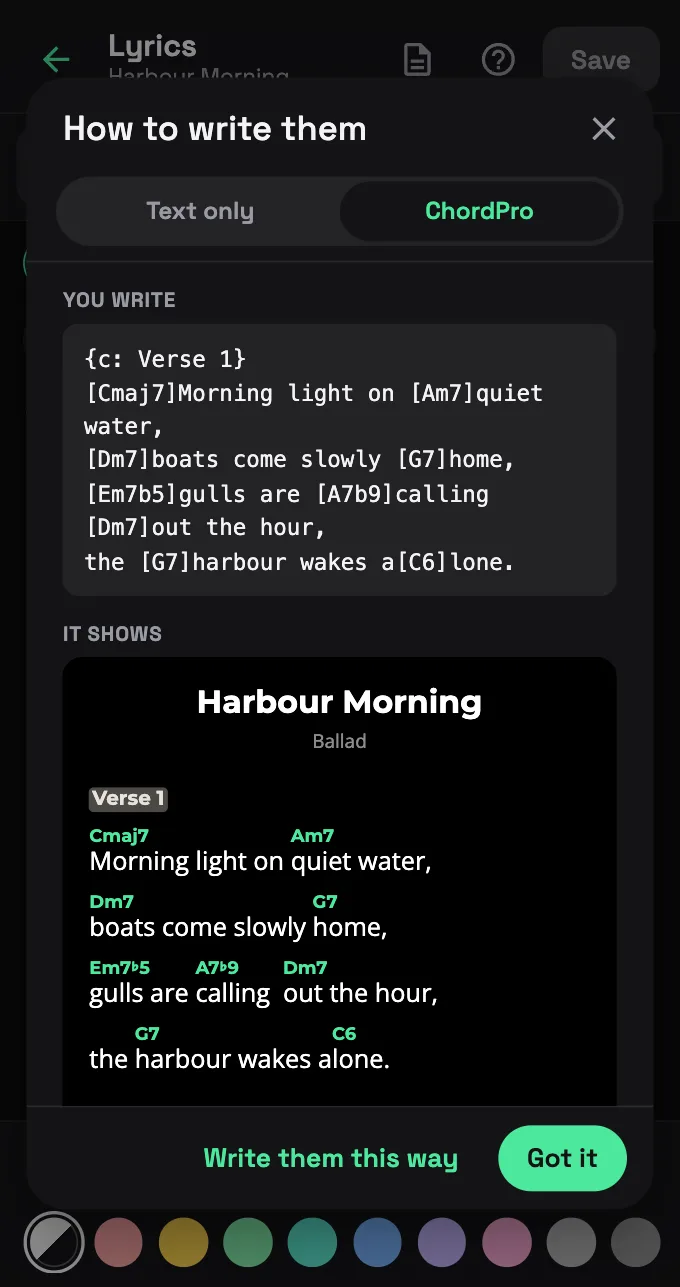
Gigplay reads ChordPro files. Open a .cho, .chordpro, .chopro or .crd file with it from a message or your files, or choose it under Import a file in Settings, Library: the song comes in with its lyrics and their chords, a chart made from those chords, and the title, composer, key and tempo. A file of several songs comes in as a playlist named as the file (Bringing in your songs). In the song's editor, the Lyrics tab takes words in ChordPro style too, chords in brackets before the word they fall on, with a preview under the field, and those chords change key with the song.
It writes them as well. Export, ChordPro, starts the file with {title}, {artist} (the song's composer), {key} and {tempo}. If the song's lyrics are written in ChordPro, those lyrics follow, with their chords, in the key shown. If not, the chart's rows follow as ChordPro grids, one per section, each named by a {comment}, and then the lyrics as plain text (see Sharing, exporting and backups).
How should you save a ChordPro file?
- Plain text, UTF-8. Not a word-processor document: its formatting hides the brackets from other programs. UTF-8 keeps accented words and other alphabets intact.
- The usual extensions are
.cho,.crd,.chopro,.chordand.pro; the format's own site advises.chofor new files. They are all the same plain text.