
A good setlist app does three jobs. It builds a set quickly from songs you already have, without copying them. It shows each song in the key, tempo and form you play it on that gig. And on stage it gets you from one song to the next with one move, with no network, no sign-in and nothing to read twice. Everything else is a bonus. Below is what to look for, what to test before you trust it on a gig, and what to avoid.
What is a setlist app actually for?
Paper setlists work: a marker, a sheet taped to the floor. An app earns its place when the setlist is tied to the charts. You tap the next title and the chart is there, in the right key. That is the job to judge it on.
So first decide what you need on the screen during the gig:
- Titles only (you know the songs): a list in big type, with keys and maybe count-in tempos.
- Titles and charts (bands with deps, singers who change keys, a long repertoire): each song opens its chord chart, lead sheet or lyrics. If you sing, the words matter most: see choosing a lyrics app for singers.
- Charts for the whole band: everyone reads from the same set, so it has to travel to other phones.
If you are still working out the order itself, that is a separate skill: see how to make a setlist for a gig.
What should it do before the gig?
- Build a set from your library, fast. Pick songs in order from a list or a search, rather than creating each one again. A song should exist once: fix a wrong chord in it and every setlist that holds it has the fix.
- Reorder by dragging. Setlists change in the van. Moving song 9 to slot 3 should take a second.
- Mark the sets. A three-set night is one list with breaks in it, not three files. Look for separators or headings ("Set 2", "Encores", "If they want more").
- Show what you need at a glance. Key, tempo, maybe style or who sings it. A list that shows only titles makes you open each song to check it.
- Duplicate a setlist. Saturday's wedding is last month's wedding with four songs changed.
To plan the length, you need to know how many songs fit in a set; an app that adds up song lengths helps, but only if you enter real timings.
Should the key belong to the song or to the setlist?
To the setlist, if you ever play the same song with different people. The singer at the jazz brunch takes it in F, the one at the wedding in A♭, and your practice list keeps it as written. An app that stores one key per song makes you transpose it back and forth before every gig, and one day you will forget.
Test it: put one song in two setlists, change its key in one, open the other. It should still be in its own key.
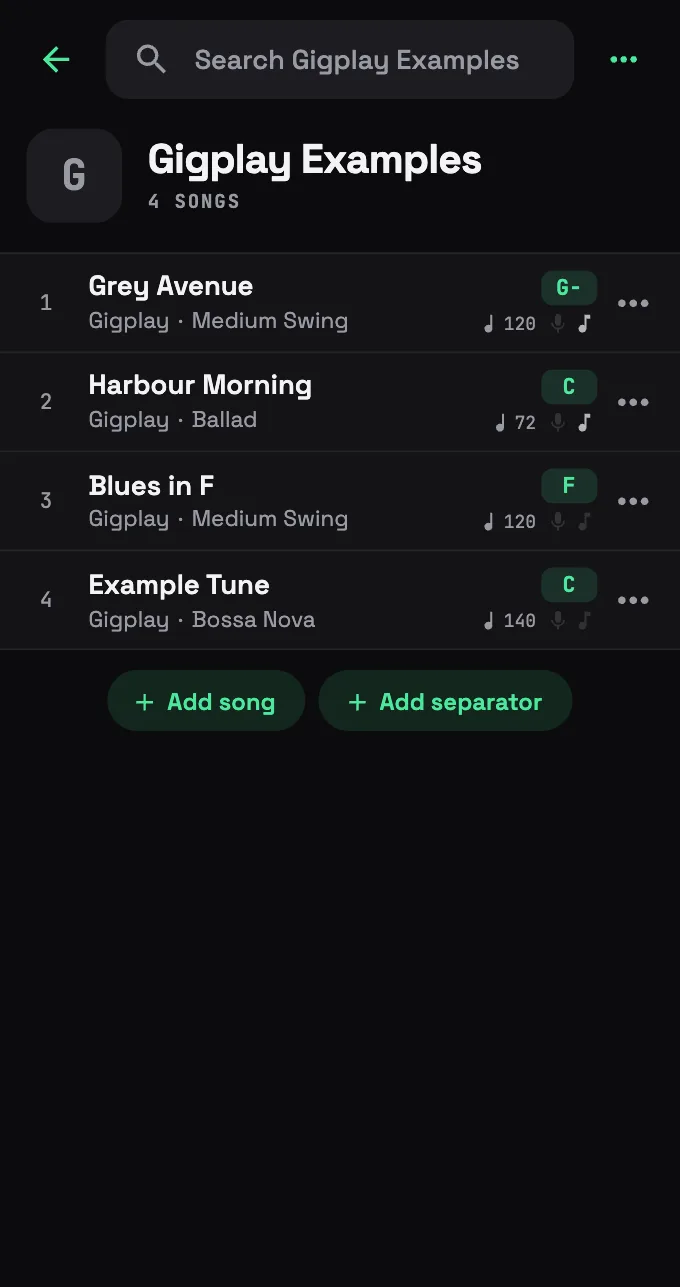
In Gigplay, a playlist is the setlist: a song's key, tempo, repeats and style are remembered in each playlist apart, and separators such as "2nd set" mark the breaks (see Playlists and your library).
What matters on stage?
This is where apps that look fine at home fall apart.
- One move to the next song. A swipe, a tap or a pedal press. If going to the next song means going back to the list first, you will be looking down between every number.
- Jumping out of order. The bandleader calls a song from set three. You need to reach it in seconds, without leaving the song and scrolling a list of 200.
- The chart fits the screen. No pinching, no scrolling in the middle of a solo chorus. If a song is too long to fit, the app should let you choose to scroll it instead.
- Dark pages. On a dim stage a white screen blinds you and lights your face. A dark mode that reaches the charts, not just the menus, is worth having.
- Works offline. A venue may have no signal backstage, and worse on stage. Turn on airplane mode and try everything.
- Hands-free turning, if you play a two-handed instrument: see page turner pedals for what to check.
How does the band get the setlist?
There are three ways, and a good app gives you at least two:
| Way | Good for | Check |
|---|---|---|
| A PDF or printed songbook | Deps, anyone without the app, a backup on paper | Does it have an index and one song per page? |
| A plain list (text or image) | The sound engineer, the venue, the group chat | Can you send it in two taps? |
| The app's own file or link | Bandmates who use the same app | Do keys and edits come across? |
The last one is the most powerful and the most fragile: it only works if everyone uses the app. Never choose an app that leaves non-users with nothing. A setlist the band can't open is just a list of titles. For what a printed setlist should show, see the setlist template.
Some apps go further and keep the band in sync: the leader changes the setlist and everyone's screen follows. That is useful in a band that changes the set on the fly, but it asks a lot: everyone on the same app, and devices that can reach each other at the venue. A file or PDF sent the day before asks nothing, and still works when the signal doesn't. Decide which your band will really keep up, and test it with the whole band before a gig depends on it.
What should you avoid?
- Sign-in to open your own songs. If the server is down or the login expires on the night, you have no set.
- Cloud-only storage. Your charts should live on the device you play from, with backups you control.
- No way out. If you can't export songs and setlists in a common format, your repertoire is locked in. Check before you type in 300 songs.
- Copies instead of links. Some apps copy a song into each setlist. Fix a chord in one, and the other twelve setlists still have the mistake.
- Small targets. A next-song button the size of a fingernail is a missed cue on a dark stage.
- A song that opens on the wrong screen. If tapping a title opens an edit screen or a menu instead of the chart, every song starts with an extra tap.
How do you test a setlist app before a real gig?
Give it an evening, with your instrument and your real songs. Not the demo songs.
- Enter or import twelve songs you play, including one with a key change and one with a coda.
- Build a two-set list with a separator between the sets.
- Put one song in a second setlist in a different key, and check that both keep their own.
- Turn on airplane mode, dim the screen, set the page to dark.
- Stand where you stand on stage, phone or tablet on its stand, and run the whole set, moving song to song as you would live.
- Jump from song 2 to song 11 and back, as if the bandleader changed the plan.
- Export the setlist as a PDF and send it to yourself. Open it on another phone.
- Make a backup, delete a song, and restore it.
Anything that took more than a moment in steps 5 and 6 will take longer in front of an audience.
If you will read from a tablet rather than a phone, read tablet vs paper charts before you buy one: the screen size decides how much of a chart fits.
A quick checklist
| Check | Pass if |
|---|---|
| Building a set | Songs picked from your library, in order, in under a minute |
| Sets within a setlist | Separators or headings between sets |
| Keys per setlist | The same song in two keys in two setlists |
| Next song on stage | One swipe, tap or pedal press |
| Jump out of order | In seconds, without going back to the list |
| Offline | Everything works in airplane mode |
| Dark charts | The chart itself is dark, not only the menus |
| Sharing | A PDF or text for non-users, a file for users |
| Backup and export | You can get all your songs out |
An app that passes all of these will cope with a function gig's three sets as well as a jazz duo's one.